Instrumental Transcommunication (ITC) refers to methods that use audio or video equipment to obtain recordings that some believe demonstrate communication from deceased persons, ghosts, or other entities.
One example of ITC is Electronic Voice Phenomena (EVP). Another method that has been developed in recent years involves techniques for making video recordings that may include unexplained images of faces or figures. Such methods are known as Video Instrumental Transcommunication, or VIdeo ITC.
The Klaus Schreiber Method
Klaus Schreiber Method
One of the most important and interesting techniques for making Video ITC recordings was pioneered by Klaus Schreiber in the 1980s.
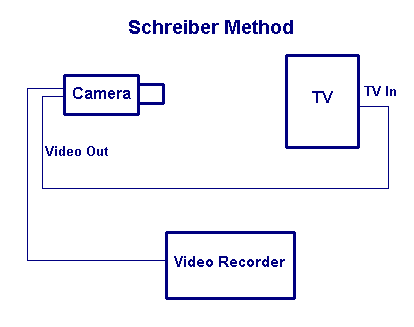
Schreiber's method involves recording from a video camera that is pointed at a TV or video monitor which itself displays the output from the video camera. This sets up a feedback loop between the camera and TV which, when the camera is correctly adjusted for zoom and focus, results in strange visual displays.
The effect generally sought is one where swirling clouds appear. Best results are obtained when the camera is focussed just beyond the TV screen (i.e., the image is slightly out of focus). Somewhat different results are obtained depending on the distance between the camera and the screen (which may be from a few inches to a few feet).
Once the desired swirling effect is obtained, a recording is made of the output from the video camera. Usually recordings are quite brief (generally between 30 sec and 5 minutes) because every frame of the recording needs to be carefully examined for any possible anomalous images. Some researchers like to speak out loud during the recording, inviting the "spirits" to appear.
Recording Video ITC using a Video Editor
If you have a digital camcorder, the Klaus Schreiber Method can be easily adapted for use with video capture and editing software. To do this, follow these steps:
Connect your camcorder to the computer, using the USB, Firewire (IEEE 1394), or other video input cable.
Open your video editing software and select "capture video". Choose a filename for the recording.
Set the manual focus of the camcorder at about 12 inches (30cm). Do not use autofocus.
Hold the camcorder about 6-10 inches (15-25cm) from the screen and point it at the preview window in your video editing software. You should see the output from the camcorder in the preview window.
Slowly zoom in on the center of the preview window until you see the swirling clouds, then stop zooming.
Start video capture (you do not need to record using the camcorder, but you can also do this if you want to make a backup).
If you wish, talk to the "spirits", inviting them to appear, or ask questions.
While you are recording, gently aim the camcorder into the dark areas and swirling clouds.
When you have finished recording, examine every frame of the video for any anomalous images. You can use your video editing software to take pictures of individual frames.
If you are not satisfied with the results, try experimening with different focus, zoom and distance from the screen.
The short video clip below demonstrates the basic procedure. This video was made using a Sony DCR-H37E digitial camcorder, which has a 40x optical zoom, and Windows Movie Maker.
CAUTION: This video contains flashing images
Here are frames from another recording.
Comments
As with Electronic Voice Phenomena, skeptics point out that the images produced using Video ITC methods are generally of low quality and simply reflect the tendency of the human brain to perceive faces and figures in what are, essentially, random visual patterns (a tendency known as pareidolia).
However, results obtained by some researchers (especially by Klaus Schreiber) are quite dramatic, and the phenomenon has yet to be fully explained.
Further Study
Books
Fontana, D. (2005). Is There An Afterlife?: A Comprehensive Overview of the Evidence. O Books.